Showing posts with label CMD Hacks. Show all posts

Friday, 14 November 2014

How to Hack any Computer Connected to a Same LAN

Hi HackVenture Readers!

Today I am telling you a trick "How to Hack
any Computer Connected to a Same LAN".

Here are the simple steps .....

1) Open Command Prompt by Press "Win+R".
2) In CMD type net view.
This appear like this ....

               C:\>net view

Server Name                  Remark 
--------------------------------------------
                     \\ hackventure
                     \\ avengers
                     \\ xyz
             \\ abc

Here you can get all the names of all the
computers machine names which connect
with your LAN.

Now you got the name.  Lets start hacking i
nto the systems.

After you get server name now type tracert
command for knowing IP of the victim machine.

        Example: C:\> tracert hackventure

Here you get the IP address of the hackventure
computer machine.

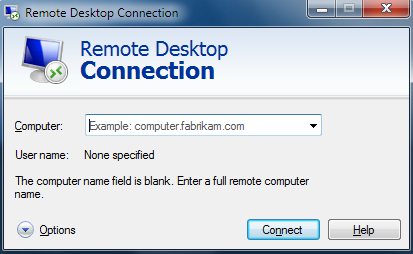
Now go to windows start button and type
Remote Desktop Connection


After clicking it will look something like this.


Now type the IP address or computer name of victim machine.


Click on Connect
It will also ask administrator password which is common as usual you known about.

After few second Victim machine shown in your Computer..
Now you can access that machine to open website,
files, Software's, etc


Enjoy the trick.

Thank You!
+Muzammil Khan

Thursday, 13 November 2014

Chatting with Friends Through Command Prompt

Hi HackVenture Readers!

Today I am telling you a cmd trick
"Chat with Friends Through CMD Prompt".

Here are the steps ....

1) The very first thing you need is your
friend's IP Address.
2) Open Notepad & Copy this code as it is ...!

@echo off
:A
Cls
echo MESSENGER
set /p n=User:
set /p m=Message:
net send %n% %m%
Pause
Goto A

3) Save this file "Messenger.Bat".
4) Open Command Prompt.
5) Drag this file(.bat file) ovr to CMD Prompt
and press Enter.
6) A window will appear like this.


7) Now, type the IP Address of your friend's computer
you want to contact.
A window will appear like this


8) Start Chatting with your friend type
your message and press Enter....


Enjoy a new way of chatting with the
help of CMD Prompt.

Thank You!
+ Muzammil Khan

Tuesday, 21 October 2014

Bootable USB with the help of Command Prompt

Hi HackVenture Readers!

Today I am telling you a trick for creating
your USB bootable with the help of CMD
prompt.

Here are the steps ...

1. First format your USB drive in NTFS file system.
You can do it by attaching your USB drive to your
system and then format it from My Computer window.

2. Now open Command Prompt window from Start menu.
Right-click on Command Prompt entry in start menu and
select "Run as administrator" option.

3. Now type diskpart in Command Prompt window and
press Enter. It'll launch DiskPart program:


4. Now provide following command:
list volume

It'll show a list of all drives in your system.
Look for your USB drive entry. As in the below screenshot,
the USB drive is "G" which you can determine from its "Type" entry.

Now you have to select the USB drive volume by providing
select volume no. command. Since in our case volume no. of
USB drive is "Volume 4", the command would be:
select volume 4

Now we have to make this drive active. So provide active command:
active

Now exit from DiskPart using exit command.


5. Now we need to create Boot sector on USB drive.
We'll use "bootsect.exe" utility for this task. You can find this utility in
Windows Vista setup disk. It'll be present in "Boot" directory.
Now provide following command in Command Prompt:

bootsect /nt60 G:

Here G is drive letter of USB drive. Replace it with the correct drive letter if
your system has some other letter for USB drive.


Here G is drive letter of USB drive. Replace it with the correct drive
letter if your system has some other letter for USB drive.


6. At last, copy all files/folders from Vista Setup DVD to your
USB drive and you have done.


Thank You !

+ Muzammil Khan


Sunday, 19 October 2014

How to Lock any folder without using Software

Hi HackVenture Readers !

Today I am telling you a trick by which
you can lock any folder without using any
software.
This trick will run on Windows XP/7/8.

Here are the steps ....

1. Make a folder in C drive and rename it
as "hackventure" without quotes.
2. Open command prompt from Start menu.
3. Type "attrib +s +h C:\hackventure" without
quotes and press Enter.
4. This command will make your folder invisible
and it cannot be seen even in
hidden files and folders
5. To make it visible again type
"attrib -s -h C:\hackventure" without quotes.
6. Therefore you can lock any other folder by
changing the location C:\hackventure to address
of your folder.

Thank You!

+ Muzammil Khan